These are not the same thing. A print can feel completely dry to the touch while the ink beneath the surface is still uncured, leaving it vulnerable to washing out, cracking, or peeling within a few wash cycles. It's one of the most common — and most expensive — mistakes in the shop.
This guide breaks down exactly how long screen printing ink takes to dry and cure by ink type, which variables extend or compress those timelines, how to verify cure without guessing, and which curing tools are appropriate for different production volumes. Timelines range from under a minute to 24+ hours depending on ink chemistry, equipment, and shop conditions — so there's no single universal answer. But there are reliable benchmarks to work from.
TL;DR: Quick Reference Dry and Cure Times
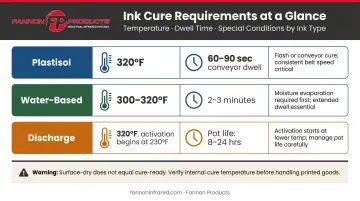
- Plastisol ink never air dries — requires heat cure at 320°F, typically 60–90 seconds in a conveyor dryer
- Water-based ink air dries to the touch in ~10–15 minutes, but needs 300–320°F for 2–3 minutes for a washfast bond
- Discharge ink behaves like water-based — surface dries quickly, but needs heat activation at ~320°F to fully activate
- Humidity, ink deposit thickness, and fabric type all shift these baselines significantly
- "Dry to the touch" never means "ready to wash" — always heat cure first
Drying vs. Curing: Why the Distinction Matters
Most print failures trace back to one misunderstanding — and it costs shops real money.
Drying is a physical process — moisture or solvents evaporate from the ink surface, making it feel dry to the touch. It can happen with air exposure, ambient heat, or mild forced air.
Curing is a chemical or thermal process where the ink reaches a specific temperature threshold throughout the entire ink layer, causing the binders to cross-link and fuse permanently to the fabric fibers. Surface temperature is not enough. The full ink deposit, from top to bottom, must reach cure temperature.
Why Surface-Dry Isn't Safe
This is where prints fail. The surface hardens first, while deeper ink layers remain uncured. The print looks fine off the press — it may even pass a casual scratch test — but after one or two washes, it cracks, flakes, or fades. Anatol identifies cracking, splotchy prints, and washout as the primary signs of improper plastisol cure, and the Wilflex Athletic Trophy White TDS explicitly states that improper cure results in poor wash fastness and inferior adhesion.
Plastisol vs. Water-Based: Different Failure Modes
These two ink types fail in opposite ways:
Plastisol contains little to no solvent and stays wet indefinitely at room temperature. Cure only begins when the entire ink film reaches approximately 320°F, making it chemically inert until heat is applied.
Water-based ink goes through two distinct phases: moisture must fully evaporate first, then the ink layer must reach and hold cure temperature for polymer binders to bond to the fabric.
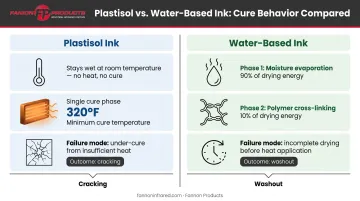
That moisture step matters more than most printers expect. According to Permaset's Heat Curing TDS, roughly 90% of curing energy goes toward water removal and only 10% toward polymer cross-linking. Moisture management isn't a pre-step — it's most of the work.
How Long Does Screen Printing Ink Take to Dry by Ink Type
Plastisol Ink
Plastisol is the most forgiving ink to work with on press. Mishandle the cure, though, and that forgiveness disappears fast.
Key facts:
- No air drying, ever. Room temperature does nothing.
- Full cure requires the entire ink film to reach 320°F (160°C) — not just the surface
- Low-cure and flexible formulas from some manufacturers can cure as low as 250–275°F; always check the TDS for your specific ink
Cure time by method:
| Method | Typical Time | Notes |
|---|---|---|
| Conveyor dryer | 60–90 seconds dwell | Depends on belt speed, chamber length, deposit thickness |
| Heat press | 20–30 seconds at 20–30°F above label cure temp | Set higher than label temp to compensate for press variables |
| IR panel heater | 30–40 seconds at ~320°F | Faster than a standard heat press; timing is equipment-specific |
The 60–90 second conveyor dryer figure is shop-floor guidance, not a universal specification. Your actual dwell time depends on your dryer's chamber length and belt speed.
Anatol notes plastisol should spend at least 20–30 seconds at actual curing temperature. That clock doesn't start when the garment enters the dryer; it starts when the ink itself hits 320°F.
Water-Based Ink
Water-based ink is lower in VOCs and produces a softer hand feel, but its two-phase cure requirement makes it more technically demanding.
Air dry time: Approximately 10–15 minutes to the touch under normal shop conditions. This only means surface moisture has evaporated — it is not cured.
Full cure requirements:
- Permaset Aqua, SuperCover, Permatone: 320°F (160°C) for 3 minutes
- Green Galaxy water-based inks: 90 seconds at 360°F, or ideally 3 minutes at 300–320°F
- In all cases, ink temperature must hold at cure temperature for at least 20 seconds after moisture is fully driven out
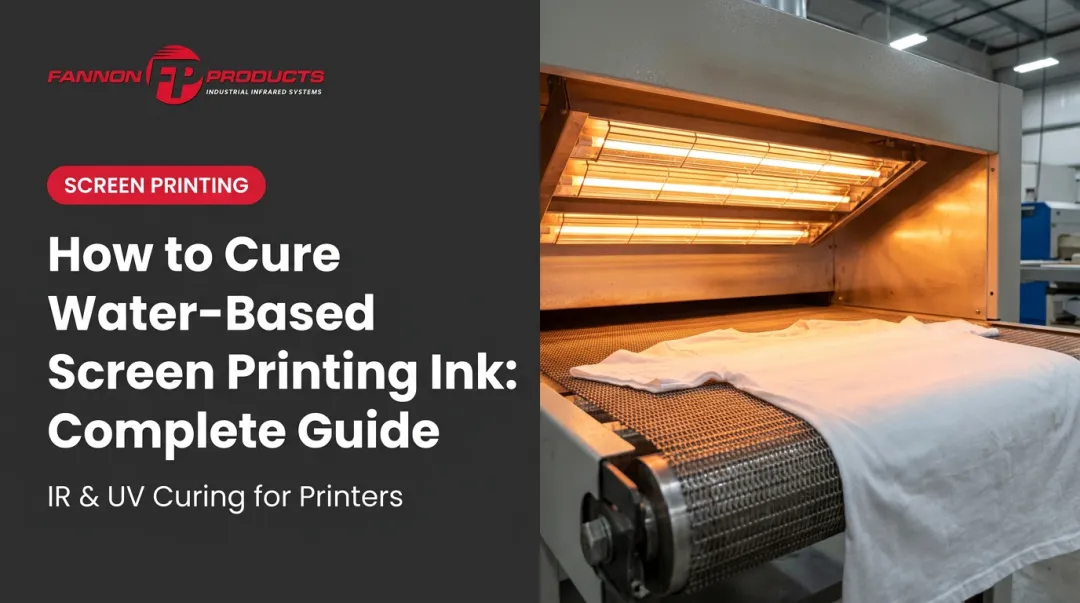
Water-based prints cannot exceed 212°F until all moisture is gone. Pushing temperature too fast before moisture escapes creates steam that disrupts the ink layer, which is why forced-air conveyor dryers are the preferred cure method.
A minimum 6-foot forced-air conveyor can achieve water-based cure in approximately 1:30–2:00 minutes. Flash dryers and smaller setups often require cure additives, such as Matsui Fixer WF-N at 1–4%, which lowers the required cure temperature to 300°F.
Discharge Ink
Discharge ink behaves similarly to water-based for drying purposes — the surface dries within minutes — but the chemistry underneath is different.
- Cure temperature: 320°F (160°C), same as standard plastisol
- The activating agent (zinc formaldehyde sulfoxylate or similar) begins the dye-removal reaction around 230°F and completes most of it by 260°F, but the full ink layer still must reach cure temperature
- Pot life matters: CCI D-Powder activated inks must be used within 8 hours for best results; CCI D-White with D-Powder has a longer pot life of up to 24 hours. Once activated, discharge ink loses effectiveness over time regardless of drying — factor this into how much ink you mix per session
Key Factors That Affect Dry and Cure Times
Understanding the variables that shift these baselines is how you avoid reprints and customer complaints.
Humidity and Ambient Temperature
High humidity significantly slows moisture evaporation from water-based inks. Air-dry time can stretch well beyond 15 minutes in a humid shop, and conveyor cure times may need adjustment as well.
The opposite is also a problem. A very hot, dry shop environment can cause water-based inks to dry in the screen prematurely, creating registration and coverage issues mid-run.
Permaset's technical data sheet recommends testing time and temperature under your actual local conditions, including fabric moisture content, ambient temperature, and relative humidity. No single published spec accounts for every shop environment.
Ink Deposit Thickness
A heavy ink deposit contains far more mass to heat through. A thick plastisol lay-down from a 110-mesh screen or multiple passes takes longer for heat to penetrate to the bottom of the ink layer than a fine-detail print through a 230-mesh screen. This is why thick specialty inks (underbases, white inks on darks, puff inks) require longer conveyor dwell times, not just higher temperature.
Fabric Type and Substrate
- Cotton absorbs ink and moisture differently than synthetic blends
- Polyester and tri-blends are heat-sensitive and can be damaged by the same temperatures that cure plastisol without issue on cotton — low-cure inks become relevant here
- Non-porous surfaces (paper, glass) don't absorb moisture at all, changing how heat distributes through the ink layer
Equipment Calibration
A laser temperature gun can read 120–150°F hotter than actual ink temperature early in the curing process. A dryer running 20–30°F below its displayed temperature (a common problem) produces under-cured prints that look fine until they're washed. Verify actual ink surface temperature using a laser thermometer or donut probe, not the dryer's displayed temperature alone.
Drying and Curing Methods: Tools, Time Estimates, and Best Uses
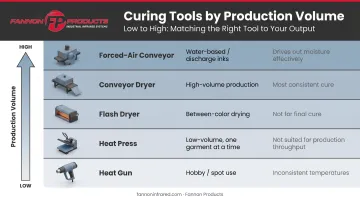
Each curing tool has its appropriate context. Using the wrong one doesn't just slow you down — it produces inconsistent results.
| Tool | Best Use Case | Limitations |
|---|---|---|
| Heat gun | Hobby/occasional use, spot curing | Inconsistent; impossible to verify actual ink temperature |
| Heat press | Low-volume shops, water-based curing with hover step | Consistent but slow; one garment at a time |
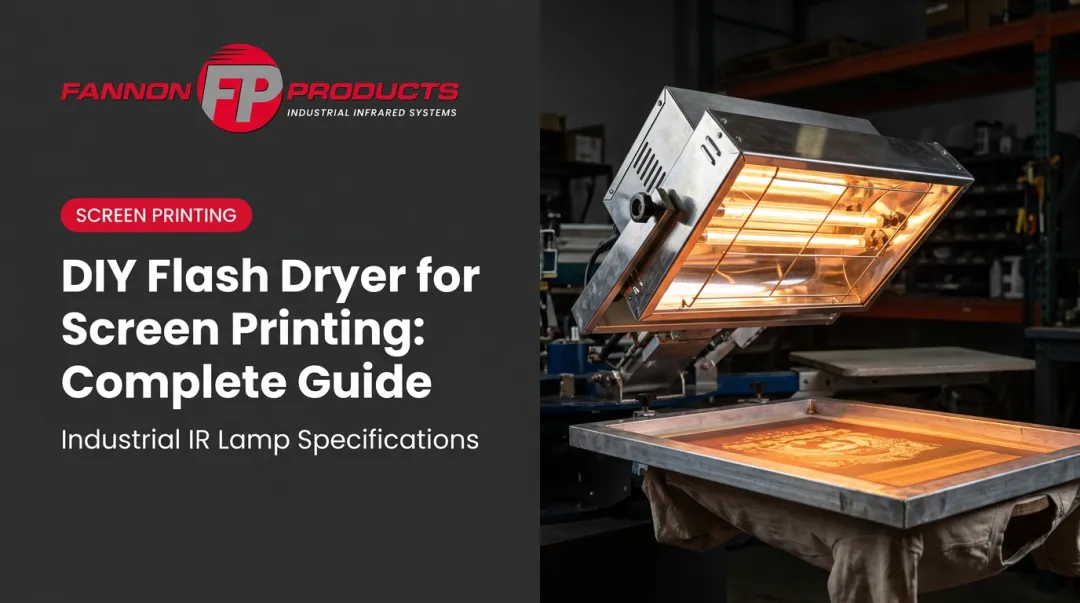
| Flash dryer | Between-color drying in production runs | Not typically used for final cure; over-flashing can prevent layer adhesion |
| Conveyor dryer | High-volume production | Most consistent and scalable; adjust belt speed to control dwell time |
| Forced-air conveyor | Water-based and discharge in production | Preferred for moisture-heavy inks; drives out water before cure phase |
IR-Based Curing Systems
Infrared conveyor dryers and IR lamp systems are the standard in professional screen printing environments. Medium-wave infrared technology is less sensitive to ink color variation — including both light and dark plastisols — than short-wave emitters, which directly affects cure consistency across multicolor jobs.
Fannon Products, with nearly 70 years of experience in infrared lamp manufacturing, produces replacement lamps specifically engineered for M&R flash dryers used in screen printing. Their medium-wave lamps include:
- Fast-response star coil reaching operating temperature in under one second
- Rated 5,000+ hours of service life
- Configurations from 1,000W to 2,000W at 208V, 240V, and 480V
For shops running production volume, lamp performance is a process variable — a degraded lamp running below spec is a direct cause of under-cured prints.
How to Tell If Your Screen Printing Ink Is Fully Cured
Don't rely on how a print looks right off the press. Use these verification methods.
The Stretch Test
Once the print has cooled to room temperature, grip the printed area with both hands and stretch the fabric to about half its maximum stretch. Properly cured plastisol should stretch without cracking or flaking. If the surface cracks, the deeper ink layers didn't reach cure temperature — the print needs more heat or longer dwell time.
The Wash Test
Launder the garment once or twice on normal settings and inspect for fading, cracking, or peeling. ScreenPrinting.com recommends at least 3 wash-dry cycles under harsh conditions for a thorough wash test.
Run wash tests whenever any of these variables change:
- Switching to a new ink brand or formula
- Changing or upgrading curing equipment
- Adjusting process parameters (temperature, belt speed, dwell time)
- Starting a new production run after extended downtime
Most manufacturers also recommend waiting 24–48 hours after printing before wash testing, giving the ink time to fully stabilize.
Temperature Verification
Measure actual ink surface temperature with a laser thermometer or donut probe during production, not just once during equipment setup. Build it into your regular shop practice. If readings show the ink isn't hitting cure temperature despite the dryer's display saying otherwise, recalibrate or have the equipment serviced. Make temperature verification routine — not just a troubleshooting step.
Frequently Asked Questions
How long to let screen print ink dry?
For water-based inks, surface dry takes roughly 10–15 minutes under normal shop conditions. Plastisol never air dries; it stays wet without heat. Neither is "ready to wash." Both require heat curing before laundering.
Can you over-cure plastisol ink?
Yes. Excessively high temperatures or prolonged heat exposure make plastisol brittle, reduce its elasticity, and can scorch the fabric. Reaching 320°F matters — but so does not overshooting it by a wide margin or holding it there longer than necessary.
Does screen printing ink wash off?
Properly cured ink doesn't wash off under normal laundering. Ink that was only air-dried or under-cured will fade, crack, or wash out within the first few washes. Cure is the variable that determines durability, not the ink itself.
What lasts longer, DTF or screen print?
Properly cured plastisol screen prints are exceptionally durable, often outlasting the garment itself. DTF transfers hold up well — manufacturer claims range from 50–100+ wash cycles — but can be more prone to cracking with heavy use. Plastisol has the longer independent track record.
How do I know if my screen printing ink is cured without washing it?
Use the stretch test: gently pull the fabric and check for surface cracking. Pair it with a laser thermometer to confirm the ink reached cure temperature. The wash test is the most definitive confirmation, but these two methods give solid in-process confidence.